


Word Search Explorer
4.923.41K Reviews
App Specs
- Version
- 1.290.0
- Updated On
- License
- Free
- Downloads
- 100,000,000+
- Developer
- PlaySimple Games
- Categories
- Word
- Platform
- Android, iOS
Screenshots
 Analysis by AppCompare
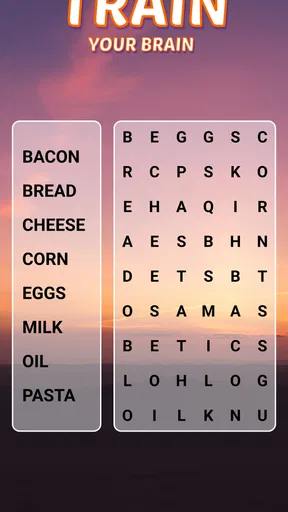
For me, the appeal of Word Search Explorer is the simple promise of a word-search grid: settle in, scan for words, and enjoy a small mental task without needing to learn complicated rules. It works best when I want a brief, low-pressure break rather than a game that demands a long session. The visual presentation is welcoming, and the familiar format makes it easy to begin even if I have only a few minutes.
A familiar puzzle with an inviting feel
Word searches are easy to understand, but a comfortable presentation matters when you return to a puzzle repeatedly. This one is made by PlaySimple Games and is presented as a word game for seniors. I can see the value of that focus: the central activity is recognizable, and the visual design aims to make the experience approachable rather than turning every screen into a test of speed or gaming skill. That does not mean it is only for older players; anyone who likes scanning a grid for hidden words can enjoy the basic idea.
The game is free to download, rated for Everyone, and has an average rating of 4.9 from around one million ratings, with more than 50 million installs. Those figures suggest that the format has found a large audience, though popularity alone cannot tell you whether its pace or presentation suits your eyes and habits. I would treat it as a casual puzzle to try, not as a promise that every player will find it equally comfortable.
A Universe of Words
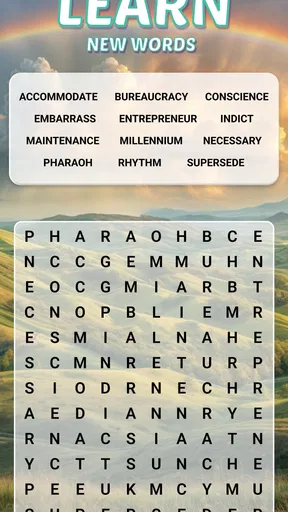
First off, the sheer variety of puzzles in Word Search Explorer is pretty mind-blowing. Whether you’re a word aficionado or just a casual player, there’s something here for everyone. I spent hours sifting through different categories, from animals and countries to more niche themes like famous historical figures. It keeps things fresh and exciting every time I open the app.
How I fit a puzzle into an ordinary day
A word search is particularly handy in the gaps that appear during a normal day: while waiting for an appointment, taking a quiet break, or unwinding before bed. I like that the task has a clear endpoint within the puzzle itself. I can concentrate on finding a word, pause when something else needs my attention, and return without having to remember a complicated sequence of actions. That makes this a better fit for fragmented spare time than a story-driven game that expects me to follow a plot or a competitive game that pressures me to keep up.
One practical way to make a session feel less tiring is to scan methodically instead of jumping randomly around the board. I start with an unusual letter in the target word, then check the nearby rows, columns, and diagonals for the next letters. When I find one, I mark it and move to another part of the grid rather than repeatedly rechecking the same area. This is not a special feature; it is simply a useful habit for this kind of puzzle, especially when a theme contains several familiar words that start with the same letter.
The theme can also shape how I approach a grid. With a category I know well, I can use the likely vocabulary as a mental checklist, but I try not to assume that every answer will be the first word that comes to mind. With an unfamiliar topic, I slow down and let the listed words guide my search instead of relying on background knowledge. That small adjustment keeps the game enjoyable for both confident word players and people who are simply looking for a calm activity.
Worth Reading Before You Choose

Baby Panda World Brings Quick Play to Modern Phones, but Its Game Library Feels Busy

ESPN’s Live Game View Makes Following Close Games Easier

QuizzLand Review: A Good Fit for Short Trivia Breaks, Not Every Player

Basketball Stars: Multiplayer Is Fast, but Can It Recover When Matches Go Wrong?

WEBTOON Turns Phone Updates Into a Better Reading Routine

Link to Windows Runs on Shared Habits, Not Social Feeds
Interface and Usability
The interface is clean and intuitive, which is a huge plus for me. You don’t need to be a tech wizard to navigate through the app. The puzzles load quickly, and the controls are as smooth as butter. I especially appreciate how you can adjust the difficulty level. Feeling like a word master today? Crank it up! Just want to relax? Dial it down. The choice is yours.
That flexibility matters more than it might seem. A tougher setting can make a short session feel absorbing when I have the attention to spare; an easier one is preferable when I am tired or just want a gentle distraction. I would not choose the harder option simply to prove I can finish it: if I am losing track of lines or straining to follow the grid, stepping down is a sensible way to keep the puzzle relaxing. For an older player, or anyone who prefers larger-looking, less demanding play, comfort should take priority over chasing difficulty.
If you are deciding whether this will work well on your device, the game requires Android 8.0 or later. The current version is 1.256.0. I would also consider the practical setting where you plan to play: a bright, steady screen and a comfortable viewing distance can make it easier to search a dense grid than trying to squeeze in a round while walking or dealing with glare. The puzzle itself is calm, but scanning still takes attention, so it is best enjoyed when you can look at the screen without rushing.
Features That Shine
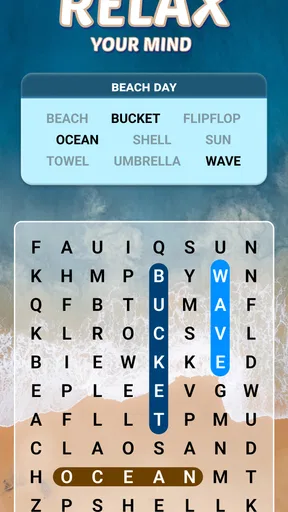
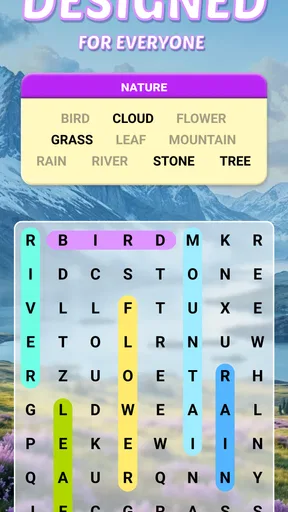
What truly sets this app apart are the little details. For example, there’s a handy feature that lets you highlight words in different colors. Not only does it make the game visually appealing, but it also helps keep track of words you’ve found. Plus, the app throws in daily challenges and rewards, which are perfect for keeping you hooked and coming back for more. There's nothing like a little reward to boost your motivation!
The colored highlighting has a useful purpose beyond decoration: it gives my eyes a quick visual record of which parts of the grid I have already solved. I find that especially helpful when several words overlap or cross the same area. A good habit is to use the markings as a map of progress rather than repeatedly tracing completed words. If the colors start to make the board feel busy, I can focus on one unsolved target at a time instead of trying to take in the whole grid at once.
Daily challenges and rewards can provide a reason to return, but I would keep them in perspective. They suit someone who enjoys a small routine, such as opening the game during a regular coffee break. They are less important if I only want an occasional puzzle and do not care about maintaining a streak of play or collecting rewards. I would not let a daily prompt turn a relaxing pastime into another obligation; the main value is still the word search itself.
Where it differs from other word games
Compared with a crossword, this is more about visual scanning than recalling definitions or filling intersecting clues. That makes it easier to start when I do not feel like solving language riddles, although players who want vocabulary tests or clever clue-writing may find it less satisfying. Compared with a timed word game, the appeal is the deliberate search through a grid rather than racing against a clock or competing over quick answers. If I want a quiet puzzle, that distinction is a strength; if I want a fast, score-focused challenge, another type of word game may suit me better.
It also differs from pen-and-paper word searches in convenience: I can open a puzzle on my phone and use the on-screen highlighting to track found words. The trade-off is that a phone screen is still a small viewing surface for some people, and digital rewards or competitive elements may be distractions rather than benefits. Anyone who prefers printed puzzles, avoids screens, or wants to work through a book at their own pace may be happier with paper. The best choice depends less on which format is “better” and more on where and how you like to solve.
Community Vibes
I love how Word Search Explorer fosters a sense of community. There’s a leaderboard where you can see how you stack up against other players. It’s a fun way to add a little competitive edge to your experience. And if you’re ever stuck, the app has an option to connect with friends for hints. Who knew word puzzles could be a team effort?
For me, the social side works best as an optional extra. A leaderboard can give a player who likes comparison another reason to keep going, while asking a friend for a hint can turn a frustrating moment into a shared one. But neither is necessary to enjoy the basic puzzle. If you would rather play privately, you can focus on the grid; if you dislike competitive rankings, it is reasonable to ignore that part of the experience rather than let it set your pace.
Who is most likely to enjoy it
I would recommend it to someone who wants a familiar, low-pressure activity, especially a player who likes word searches but appreciates digital highlighting and a choice of difficulty. It can also suit family members looking for a simple game to compare notes about: one person can spot a word another has missed, without needing to be equally skilled at a complex game. The senior-friendly presentation is a meaningful reason to consider it for an older relative, though individual comfort with phone screens and touch controls will still vary.
I would suggest skipping it if you want a deep narrative, elaborate strategy, or demanding vocabulary puzzles. It is also not my first pick when I am looking for a game that requires fast reactions or substantial variety in the underlying mechanics; the central pleasure remains finding words in a grid. Someone who gets bored once they understand a simple loop may prefer a crossword or a word-building game with more emphasis on deduction and language choices.
There is one other trade-off worth considering before settling in: the game is free, with in-app purchases ranging from $0.99 to $49.99 per item. You can begin without paying, but optional purchases may matter to people who prefer a strictly no-spend experience. I would decide in advance whether I want to make purchases and avoid treating any reward or prompt as a reason to spend. That keeps the simple puzzle at the center of the experience.
Final Thoughts
Overall, Word Search Explorer is more than just a game; it's a delightful escape into a world of words and puzzles. Whether you’re playing solo or teaming up with friends, it offers a fulfilling experience that's both challenging and relaxing. So, if you’re looking for a way to sharpen your mind and have fun in the process, this app is definitely worth a download. Happy word hunting!
My recommendation is to try it when you have a few quiet minutes and see whether the grid-based search feels soothing or repetitive to you. I would start with a comfortable difficulty, use the colored marks to keep track of solved words, and treat challenges and competition as optional extras. That approach shows off what I find most appealing without asking the game to be something it is not: a straightforward word-search companion for relaxed, bite-sized play.
Pros
- Engaging puzzles enhance vocabulary skills.
- User-friendly interface for easy navigation.
- Adjustable difficulty levels suit all ages.
- Offline mode available for uninterrupted play.
- Daily challenges keep content fresh and exciting.
Cons
- Limited themes may feel repetitive over time.
- Ads can disrupt gameplay experience.
- No multiplayer mode for competitive play.
- In-app purchases might be costly.
- Some puzzles feel too easy for advanced users.
FAQs for Word Search Explorer
What is Word Search Explorer and how does it work?
Word Search Explorer is a puzzle game that challenges players to find hidden words within a grid of letters. The game offers various levels of difficulty and themes, allowing players to explore different categories and expand their vocabulary. Players can drag their fingers across the screen to highlight words, making it both educational and entertaining.
Is Word Search Explorer available for both Android and iOS devices?
Yes, Word Search Explorer is available for download on both Android and iOS platforms. You can find it on the Google Play Store for Android devices and the Apple App Store for iOS devices. Ensure your device meets the minimum system requirements for optimal performance.
Does Word Search Explorer offer any in-app purchases or ads?
Word Search Explorer includes in-app purchases that allow users to unlock additional features, themes, or remove ads. While the base game is free to download and play, these optional purchases can enhance the gaming experience. Ads may appear between levels, but they can be removed with a purchase.
Can I play Word Search Explorer offline?
Yes, Word Search Explorer can be played offline, making it a great option for users who want to enjoy the game without an internet connection. However, some features, such as certain updates or accessing online leaderboards, may require an internet connection.
Are there any educational benefits to playing Word Search Explorer?
Absolutely! Word Search Explorer helps improve vocabulary, spelling, and cognitive skills. By engaging with different themes and categories, players can learn new words and enhance their language abilities. It’s suitable for users of all ages, making it a fun and educational tool for learning.


